How to Get Your CompTIA A+ Certification
Two vendor-neutral exams, no degree gate and a renewal cycle you manage yourself — what CompTIA asks of you before you book a seat at Pearson VUE.
Quick answer
- CompTIA A+ sets no education, age or work-experience prerequisite; CompTIA publishes a recommended amount of hands-on support experience, but nobody checks it before you test.
- You must pass two exams from the same series — CompTIA A+ Core 1 and CompTIA A+ Core 2 — each scored on a scaled range with its own published cut score.
- A+ is an industry certification issued by CompTIA, not a state licence, so it is equally valid in every US state and renews on a fixed cycle through CompTIA's Continuing Education program.
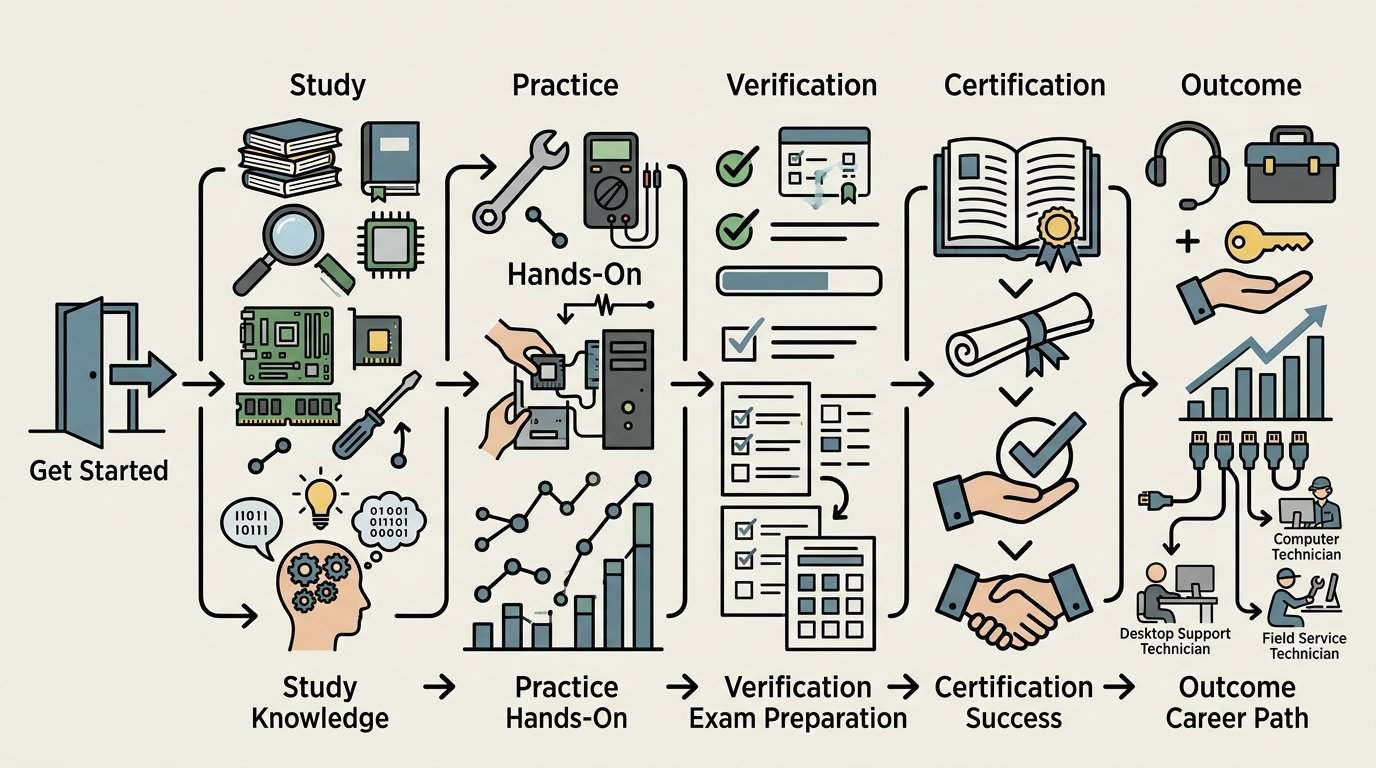
CompTIA A+ is a vendor-neutral certification for entry-level IT support work, earned by passing two exams — Core 1 and Core 2 — delivered through Pearson VUE. There is no degree, training course or work-experience requirement to sit them; anyone can create a CompTIA account, buy a voucher and schedule a test date.
Budget three to six months of part-time study if you are working another job, and check the CompTIA Store for the current voucher price in US dollars before you set a budget, because retail, academic, military and bundled rates all differ. Once you pass both exams the credential stays active for a fixed term through CompTIA's Continuing Education program.
Why This Credential Matters
CompTIA A+ is issued by CompTIA, the Computing Technology Industry Association. It is not a licence. No US state board regulates computer repair or help desk work the way boards regulate nursing or electrical trades, so no state requires A+ by law, and there is no endorsement or reciprocity process to deal with when you move between states.
What drives demand for it is employer screening. These are the places it shows up most often as a stated requirement or a strong preference:
- Managed service providers and independent repair shops hiring first-line technicians.
- Corporate and university help desks, hospital IT teams, and public school district technology departments.
- Staffing and contract agencies placing desktop refresh, imaging and deployment technicians — many filter applications on the certification before a recruiter reads them.
- Federal contractors and defence work. A+ appears on the approved list for entry-level technical roles under the US Department of Defense cyber workforce qualification requirements, which means some contract positions touching government networks will not consider you without it or an accepted equivalent.
To a hiring manager, A+ signals that you can work through a hardware fault, install and repair Windows, macOS and Linux systems, handle mobile devices and printers, understand basic networking and security hygiene, and follow ticketing and escalation procedure without being walked through it. It does not signal experience, and it will not carry you through a technical interview on its own. Treat it as the thing that gets your application read, then pair it with something concrete you have actually fixed.
CompTIA certifications are accredited by ANSI against the international standard for personnel certification bodies, which is why government agencies and large enterprise HR departments accept A+ as a measurable benchmark rather than a vendor marketing badge.
Step-by-Step Path to Certification
- Confirm the prerequisites — there are none. CompTIA sets no education, age or experience requirement for A+. It does publish a recommended amount of hands-on help desk or lab experience on the certification page; read it, but understand it is advice, not a gate. If you have neither a support job nor a lab, build the lab first: an old desktop you can strip and rebuild, a spare drive for clean Windows and Linux installs, and a free hypervisor such as VirtualBox for virtual machines.
- Download the current exam objectives from CompTIA's website. CompTIA publishes a free objectives PDF for each core exam, listing every domain and its weighting. Exam codes change with each series revision, so confirm which codes are live and which are retiring before you buy any study material — books written for a retired series cover the wrong content.
- Study to the objectives, domain by domain. Workable options include community college IT certificate programs that map their courses to the A+ objectives and sometimes include a voucher in tuition, CompTIA's own CertMaster Learn and CertMaster Practice products, video libraries available free through many public library systems, and the r/CompTIA community on Reddit for study plans and exam-day reports. Keep taking timed, full-length practice exams until your scores sit comfortably above the published cut score.
- Create a CompTIA account and buy your voucher from the CompTIA Store. Check whether you qualify for an academic rate through a participating school, a military or veteran rate, or a bundle pairing both core vouchers with training and a retake. Vouchers carry an expiry date shown on the confirmation email, so do not buy early unless you will definitely test inside that window.
- Schedule CompTIA A+ Core 1 through Pearson VUE. You choose between a physical Pearson VUE test centre and OnVUE online proctoring. Book two to four weeks ahead, because popular centres fill up, and read the identification rules first — a name mismatch between your photo ID and your CompTIA account will cost you the seat and the fee.
- Sit Core 1, then CompTIA A+ Core 2. You get a pass or fail result on screen as soon as you finish. Both exams must come from the same series. Scheduling Core 2 six to twelve weeks after Core 1 keeps the study habit intact.
- Claim the credential. Once the second result posts, log in to the CompTIA certification portal to download your certificate and accept the digital badge issued through Credly. Add the full certification name and your expiry date to your resume and LinkedIn profile, and start logging continuing education activity immediately rather than in the final year.
Exam and License Details
| Detail | Specification |
|---|---|
| Certifying body | CompTIA (Computing Technology Industry Association) — an industry certification, not a state licence |
| Exams required | CompTIA A+ Core 1 and CompTIA A+ Core 2; both must be passed, and both must come from the same series |
| Number of questions | Capped at a published maximum per exam, mixing multiple choice, drag-and-drop and performance-based simulations; the cap and the time limit are printed on the exam page for your series |
| Passing score | A scaled cut score set separately for Core 1 and Core 2 and published on CompTIA's exam pages — scaled scoring means there is no fixed number of correct answers |
| Prerequisites | None; CompTIA publishes a recommended period of hands-on experience as guidance only |
| Exam fee | Priced per exam in US dollars in the CompTIA Store, so two vouchers for the full certification. The amount you pay depends on retail versus academic, military or veteran pricing, and whether you buy a training-and-retake bundle. Confirm the current price in the store before budgeting |
| Delivery | Pearson VUE test centres or OnVUE online proctoring, available worldwide |
| Retake policy | A failed first attempt can be rebooked without waiting. A mandatory waiting period applies after repeated failures — the current rule is on CompTIA's Exam Policies page. Each attempt costs a further voucher unless you bought a retake bundle |
| Validity | A fixed term beginning the day you pass your second core exam; your expiry date is shown in your CompTIA certification record |
| Renewal requirement | Collect continuing education units and pay the CE fee through CompTIA's Continuing Education program, retake both current core exams, or earn a higher CompTIA certification such as Network+ or Security+ |
Realistic Timeline
This plan assumes eight to ten hours of study a week alongside a job. Full-time study through a community college program or a bootcamp schedule compresses it to roughly eight to twelve weeks.
- Month 1: Download the objectives for both core exams, build the home lab, and price two vouchers in the CompTIA Store so you know the real cost before you commit. Decide now whether you will test at a Pearson VUE centre or through OnVUE at home.
- Months 2-3: Work the Core 1 domains — mobile devices, networking, hardware, virtualisation and cloud, and hardware troubleshooting. Sit your first timed practice exam at the end of month 3 to expose the weak domains.
- Month 4: Buy the Core 1 voucher and schedule the exam two to four weeks out so the date is fixed and you stop drifting. Sit Core 1. If you fail, you can rebook straight away, which usually means retesting inside the same month.
- Months 5-6: Switch to Core 2 — operating systems, security, software troubleshooting, and operational procedures including scripting basics and documentation. The material is less visual than Core 1, so lean harder on practice questions.
- Month 6 or 7: Sit Core 2. Your result appears on screen at the end of the session, and the certification normally posts to your CompTIA account within a few business days, with the Credly badge email following.
- Months 7-9: Apply to help desk, desktop support and MSP technician openings with the credential on your resume, and register with technical staffing agencies that place contract deployment technicians. Begin logging activity in the CompTIA Continuing Education portal.
- End of the certification term: Have your continuing education units submitted and your CE fees paid before the expiry date on your record, or sit a qualifying higher CompTIA exam to roll the renewal forward.
Frequently asked questions
Can I take the exams at home instead of at a test centre?
Yes — both core exams are offered through OnVUE online proctoring in most countries. You need a webcam, a stable internet connection, government-issued photo identification, and a private room with a clear desk; the proctor will ask you to pan the camera around the space before the session starts. Run Pearson VUE's system check on the same computer and network you plan to use at least a day beforehand, because a hardware failure on the day is usually treated as a no-show.
What happens if I pass Core 1 but not Core 2?
A passing core result stays usable for as long as that exam series is still offered, so you can return and attempt the outstanding exam later without repeating the one you cleared. The risk is series retirement: when CompTIA launches a new version it sets a retirement date for the old one, and after that date you would have to clear both exams in the new series. The retirement date is published on the CompTIA exam page, so check it and plan to finish well inside it.
Is the certification recognised outside the state or country where I tested?
It is a global industry credential rather than a state-issued permit, so there are no transfer forms, endorsement applications or state boards involved when you relocate. An A+ earned in one US state carries identical weight in another, and employers in Canada, the UK, Australia and much of Europe recognise it. Anything touching your right to work in another country is a question for a licensed immigration attorney, not CompTIA.
What does it cost to keep the certification active?
The continuing education route combines an annual fee charged in US dollars with whatever you spend earning the required units, and many qualifying units come from free sources such as employer training, recorded webinars and documented work activity. The current fee and unit totals are listed in the Continuing Education section of your CompTIA account. Earning Network+ or Security+ during the cycle pushes your A+ expiry date forward automatically, with no separate payment for the A+ itself.

Written by
Noor writes personal essays and interviews about career changes, burnout, and starting over. She's interested in the stories people tell themselves about what a job is supposed to mean.